




Today's Memo: Find The Opinions Opposing
Counsel's Missing Browsing Annotations!

-
-
-

-

•The screen
capture, below, shows TheLaw.net Equalizer 7.0 with all 271
jurisdictional menus fully expanded. •Menus expand or
contract when you click the +/- symbols to the left of "SELECT
ALL", "All Federal Appellate", "All District Courts", "All
Bankruptcy Courts" and/or "All State".
•The checkboxes work
like a light switch. They click on and off.
•Users click any
combination of checkboxes and run their search.
-


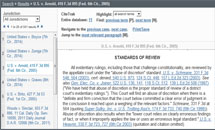
Highlighted Search Terms! Cases cited
within a case are hyperlinked! One click access to
next/previous term, next/previous/first/last page, and most
relevant paragraph.

Automatic, complimentary dual column
doc/pdf/rtf printing! Citations and pagination throughout.
Click the image to see the complete file.

Toll Free 1.877.4.LAWNET - postmaster@thelaw.net
Publishers of Software for Windows 98/ME/2K/NT/XP/VISTA
Powered by the First Amendment to the United States Constitution.
©
Copyright
1999 - 2009 TheLaw.net Corporation, Chicago/San Diego
USA. All rights reserved.
Member, Direct
Marketing Association
Windows is a registered trademark of Microsoft
Corporation. Westlaw, Key Number System, KeySearch,
KeyCite, Federal Reporter and Federal Supplement are
registered trademarks of Thomson Reuters.
http://ericjmenhart.blogspot.com
About
| Case Law
|
Software
| Support
| FAQs
|
References |
Careers |
Contact
|
Subscribe |